工作流与 Agent
本篇我们来系统梳理 LangGraph 中常见的工作流(Workflow)与 Agent(代理)模式。这两种模式是构建 LLM 应用的核心骨架,理解它们的差异和适用场景至关重要。
简单来说:
- 工作流(Workflows):代码路径是预先确定的,按照设计好的顺序依次执行。适合流程明确、步骤可枚举的任务。
- Agent(代理):动态决策自身流程和工具调用,拥有更高的自主性。适合问题和解决方案不可预测的复杂场景。
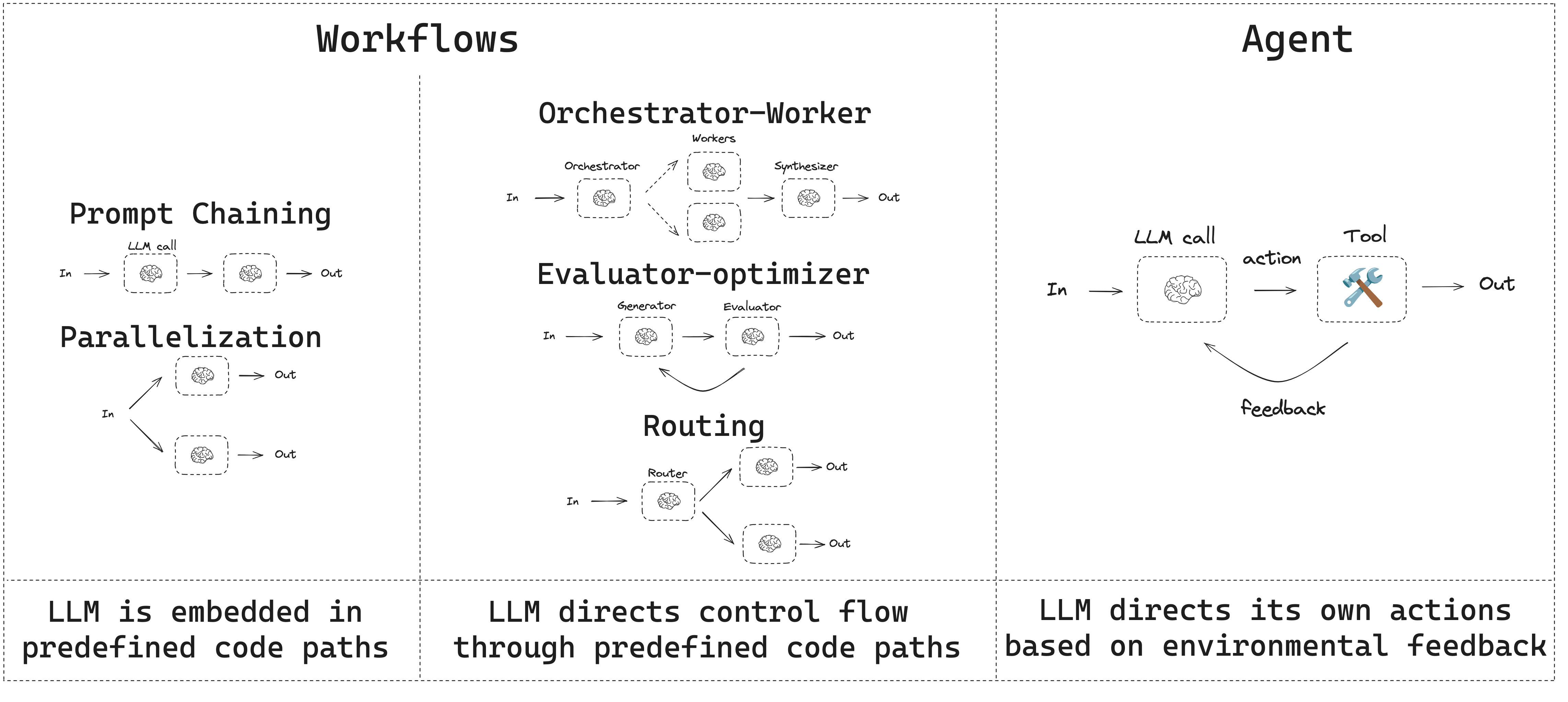
LangGraph 在构建 Agent 和工作流方面提供了诸多优势,包括持久化、流式输出、调试支持以及部署能力。
TIP
推荐使用 LangSmith 来追踪和对比这些工作流模式。按照追踪快速开始的指引,你可以直观地看到数据如何在每个步骤中流动。此外,我们还建议你配置 LangSmith Engine,它会自动监控你的追踪记录、检测问题并提出修复建议。
环境准备
构建工作流或 Agent 时,你可以使用任何支持结构化输出和工具调用的聊天模型。下面的示例以 Anthropic 为例:
- 安装依赖:
npm install @langchain/langgraph @langchain/corepnpm add @langchain/langgraph @langchain/coreyarn add @langchain/langgraph @langchain/corebun add @langchain/langgraph @langchain/core- 初始化 LLM:
import { ChatAnthropic } from "@langchain/anthropic";

const llm = new ChatAnthropic({
  model: "claude-sonnet-4-6",
  apiKey: "<your_anthropic_key>"
});
LLM 与能力增强
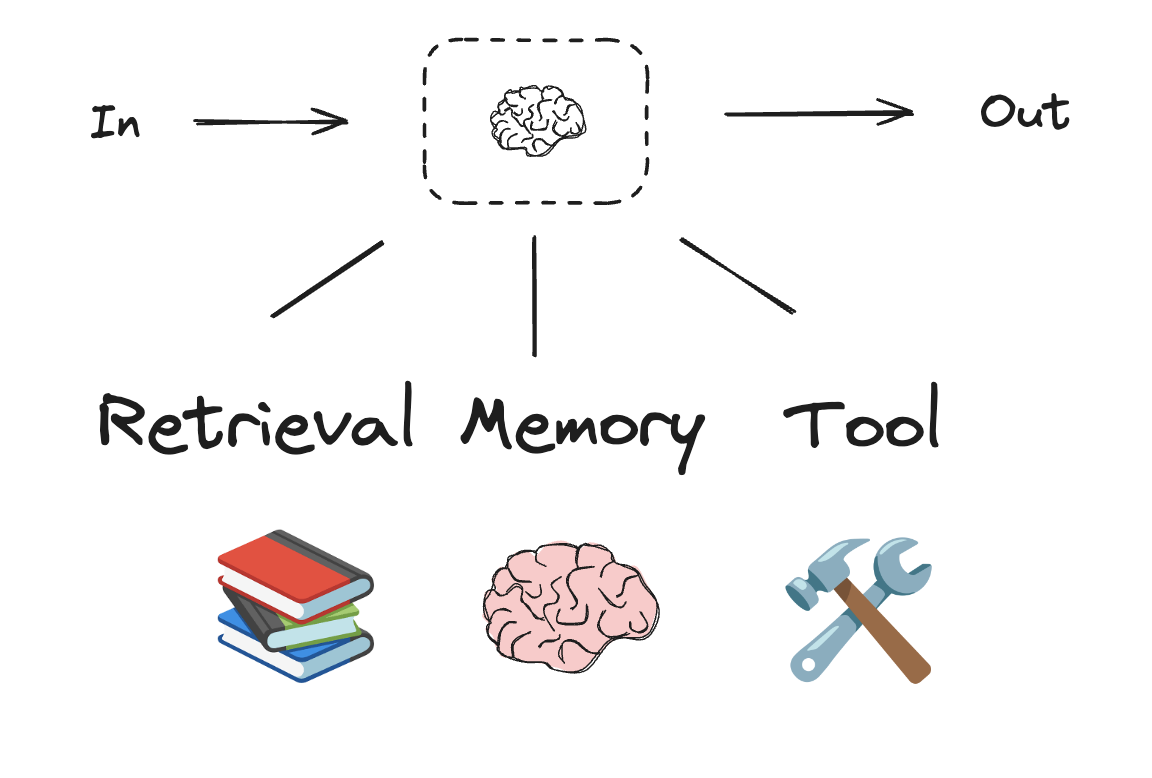
工作流和 Agent 系统都建立在 LLM 之上,通过添加各种"增强"来适配具体需求。常见的增强方式包括工具调用、结构化输出和短期记忆等。
import * as z from "zod";
import { tool } from "langchain";

// 结构化输出的 Schema 定义
const SearchQuery = z.object({
  search_query: z.string().describe("Query that is optimized web search."),
  justification: z
    .string()
    .describe("Why this query is relevant to the user's request."),
});

// 使用结构化输出增强 LLM
const structuredLlm = llm.withStructuredOutput(SearchQuery);

// 调用增强后的 LLM
const output = await structuredLlm.invoke(
  "How does Calcium CT score relate to high cholesterol?"
);

// 定义一个工具
const multiply = tool(
  ({ a, b }) => {
    return a * b;
  },
  {
    name: "multiply",
    description: "Multiply two numbers",
    schema: z.object({
      a: z.number(),
      b: z.number(),
    }),
  }
);

// 使用工具增强 LLM
const llmWithTools = llm.bindTools([multiply]);

// 用能触发工具调用的输入来调用 LLM
const msg = await llmWithTools.invoke("What is 2 times 3?");

// 获取工具调用信息
console.log(msg.tool_calls);
上面的代码展示了两种核心的 LLM 增强方式:withStructuredOutput 让 LLM 的输出严格遵循指定格式;bindTools 则为 LLM 赋予了调用外部工具的能力。接下来我们将看到,这些增强方式是所有工作流和 Agent 模式的基础构建块。
提示链(Prompt Chaining)
提示链是指每次 LLM 调用都处理上一次调用的输出。这种模式常用于执行那些可以被分解为多个可验证小步骤的明确定义任务。典型场景包括:
- 将文档翻译成不同语言
- 验证生成内容的一致性
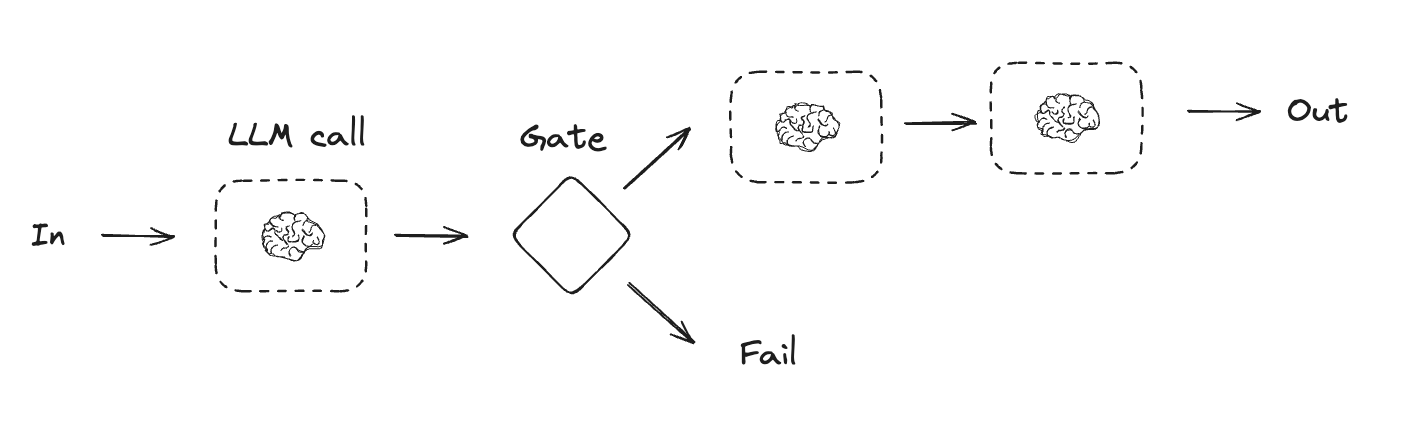
下面我们以"讲笑话"为例,演示一个三步提示链:生成笑话 -> 检查是否有笑点 -> 改进 -> 润色。
import { StateGraph, StateSchema, GraphNode, ConditionalEdgeRouter } from "@langchain/langgraph";
import { z } from "zod/v4";

// 图状态定义
const State = new StateSchema({
  topic: z.string(),
  joke: z.string(),
  improvedJoke: z.string(),
  finalJoke: z.string(),
});

// 定义节点函数

// 第一次 LLM 调用:生成初始笑话
const generateJoke: GraphNode<typeof State> = async (state) => {
  const msg = await llm.invoke(`Write a short joke about ${state.topic}`);
  return { joke: msg.content };
};

// 门控函数:检查笑话是否有笑点
const checkPunchline: ConditionalEdgeRouter<typeof State, "improveJoke"> = (state) => {
  // 简单检查:笑话是否包含 "?" 或 "!"
  if (state.joke?.includes("?") || state.joke?.includes("!")) {
    return "Pass";
  }
  return "Fail";
};

// 第二次 LLM 调用:改进笑话
const improveJoke: GraphNode<typeof State> = async (state) => {
  const msg = await llm.invoke(
    `Make this joke funnier by adding wordplay: ${state.joke}`
  );
  return { improvedJoke: msg.content };
};

// 第三次 LLM 调用:最终润色
const polishJoke: GraphNode<typeof State> = async (state) => {
  const msg = await llm.invoke(
    `Add a surprising twist to this joke: ${state.improvedJoke}`
  );
  return { finalJoke: msg.content };
};

// 构建工作流
const chain = new StateGraph(State)
  .addNode("generateJoke", generateJoke)
  .addNode("improveJoke", improveJoke)
  .addNode("polishJoke", polishJoke)
  .addEdge("__start__", "generateJoke")
  .addConditionalEdges("generateJoke", checkPunchline, {
    Pass: "improveJoke",
    Fail: "__end__"
  })
  .addEdge("improveJoke", "polishJoke")
  .addEdge("polishJoke", "__end__")
  .compile();

// 调用
const state = await chain.invoke({ topic: "cats" });
console.log("Initial joke:");
console.log(state.joke);
console.log("\n--- --- ---\n");
if (state.improvedJoke !== undefined) {
  console.log("Improved joke:");
  console.log(state.improvedJoke);
  console.log("\n--- --- ---\n");

  console.log("Final joke:");
  console.log(state.finalJoke);
} else {
  console.log("Joke failed quality gate - no punchline detected!");
}import { task, entrypoint } from "@langchain/langgraph";
// 任务定义
// 第一次 LLM 调用:生成初始笑话
const generateJoke = task("generateJoke", async (topic: string) => {
const msg = await llm.invoke(`Write a short joke about ${topic}`);
return msg.content;
});
// 门控函数:检查笑话是否有笑点
function checkPunchline(joke: string) {
// 简单检查:笑话是否包含 "?" 或 "!"
if (joke.includes("?") || joke.includes("!")) {
return "Pass";
}
return "Fail";
}
// 第二次 LLM 调用:改进笑话
const improveJoke = task("improveJoke", async (joke: string) => {
const msg = await llm.invoke(
`Make this joke funnier by adding wordplay: ${joke}`
);
return msg.content;
});
// 第三次 LLM 调用:最终润色
const polishJoke = task("polishJoke", async (joke: string) => {
const msg = await llm.invoke(
`Add a surprising twist to this joke: ${joke}`
);
return msg.content;
});
const workflow = entrypoint(
"jokeMaker",
async (topic: string) => {
const originalJoke = await generateJoke(topic);
if (checkPunchline(originalJoke) === "Pass") {
return originalJoke;
}
const improvedJoke = await improveJoke(originalJoke);
const polishedJoke = await polishJoke(improvedJoke);
return polishedJoke;
}
);
const stream = await workflow.streamEvents("cats", { version: "v3" });
for await (const snapshot of stream.values) {
console.log(snapshot);
}上面同时展示了 Graph API 和 Functional API 两种写法。Graph API 通过
StateGraph显式定义节点和边,适合复杂的有向图结构;Functional API 则用task和entrypoint以更接近普通函数的方式编写,更直观。选择哪种取决于你的场景偏好。
并行化(Parallelization)
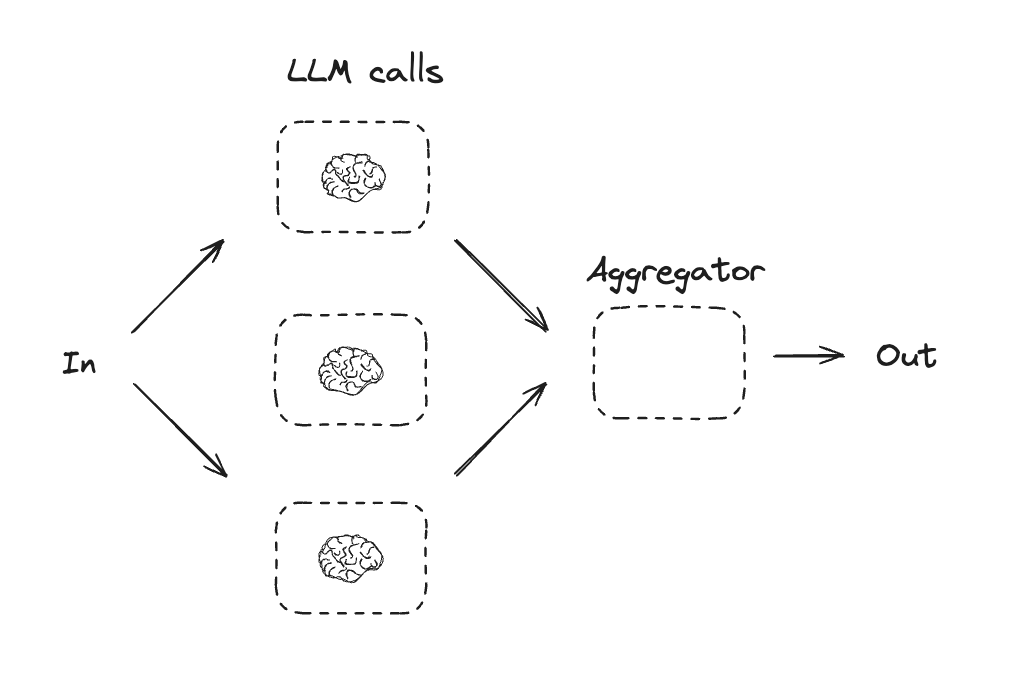
并行化是指多个 LLM 同时处理任务。这可以通过同时运行多个独立子任务来实现,也可以通过多次运行同一任务来交叉验证不同输出。并行化通常用于:
- 拆分子任务并行执行,从而提高速度
- 多次执行同一任务以检查不同输出,从而提高结果置信度
一些具体场景:
- 一个子任务处理文档关键词提取,另一个子任务检查格式错误
- 根据不同标准(引用数量、来源数量、来源质量)多次评估文档准确性
import { StateGraph, StateSchema, GraphNode } from "@langchain/langgraph";
import * as z from "zod";

// 图状态定义
const State = new StateSchema({
  topic: z.string(),
  joke: z.string(),
  story: z.string(),
  poem: z.string(),
  combinedOutput: z.string(),
});

// 节点定义
// 第一次 LLM 调用:生成笑话
const callLlm1: GraphNode<typeof State> = async (state) => {
  const msg = await llm.invoke(`Write a joke about ${state.topic}`);
  return { joke: msg.content };
};

// 第二次 LLM 调用:生成故事
const callLlm2: GraphNode<typeof State> = async (state) => {
  const msg = await llm.invoke(`Write a story about ${state.topic}`);
  return { story: msg.content };
};

// 第三次 LLM 调用:生成诗歌
const callLlm3: GraphNode<typeof State> = async (state) => {
  const msg = await llm.invoke(`Write a poem about ${state.topic}`);
  return { poem: msg.content };
};

// 将笑话、故事和诗歌合并为单个输出
const aggregator: GraphNode<typeof State> = async (state) => {
  const combined = `Here's a story, joke, and poem about ${state.topic}!\n\n` +
    `STORY:\n${state.story}\n\n` +
    `JOKE:\n${state.joke}\n\n` +
    `POEM:\n${state.poem}`;
  return { combinedOutput: combined };
};

// 构建工作流
const parallelWorkflow = new StateGraph(State)
  .addNode("callLlm1", callLlm1)
  .addNode("callLlm2", callLlm2)
  .addNode("callLlm3", callLlm3)
  .addNode("aggregator", aggregator)
  .addEdge("__start__", "callLlm1")
  .addEdge("__start__", "callLlm2")
  .addEdge("__start__", "callLlm3")
  .addEdge("callLlm1", "aggregator")
  .addEdge("callLlm2", "aggregator")
  .addEdge("callLlm3", "aggregator")
  .addEdge("aggregator", "__end__")
  .compile();

// 调用
const result = await parallelWorkflow.invoke({ topic: "cats" });
console.log(result.combinedOutput);import { task, entrypoint } from "@langchain/langgraph";
// 任务定义
// 第一次 LLM 调用:生成笑话
const callLlm1 = task("generateJoke", async (topic: string) => {
const msg = await llm.invoke(`Write a joke about ${topic}`);
return msg.content;
});
// 第二次 LLM 调用:生成故事
const callLlm2 = task("generateStory", async (topic: string) => {
const msg = await llm.invoke(`Write a story about ${topic}`);
return msg.content;
});
// 第三次 LLM 调用:生成诗歌
const callLlm3 = task("generatePoem", async (topic: string) => {
const msg = await llm.invoke(`Write a poem about ${topic}`);
return msg.content;
});
// 合并输出
const aggregator = task("aggregator", async (params: {
topic: string;
joke: string;
story: string;
poem: string;
}) => {
const { topic, joke, story, poem } = params;
return `Here's a story, joke, and poem about ${topic}!\n\n` +
`STORY:\n${story}\n\n` +
`JOKE:\n${joke}\n\n` +
`POEM:\n${poem}`;
});
// 构建工作流
const workflow = entrypoint(
"parallelWorkflow",
async (topic: string) => {
const [joke, story, poem] = await Promise.all([
callLlm1(topic),
callLlm2(topic),
callLlm3(topic),
]);
return aggregator({ topic, joke, story, poem });
}
);
// 调用
const stream = await workflow.streamEvents("cats", { version: "v3" });
for await (const snapshot of stream.values) {
console.log(snapshot);
}注意 Graph API 中三个
callLlm节点都从__start__出发,这意味着它们会被并行调度。aggregator节点会等待所有三个节点完成后才开始执行。
路由(Routing)
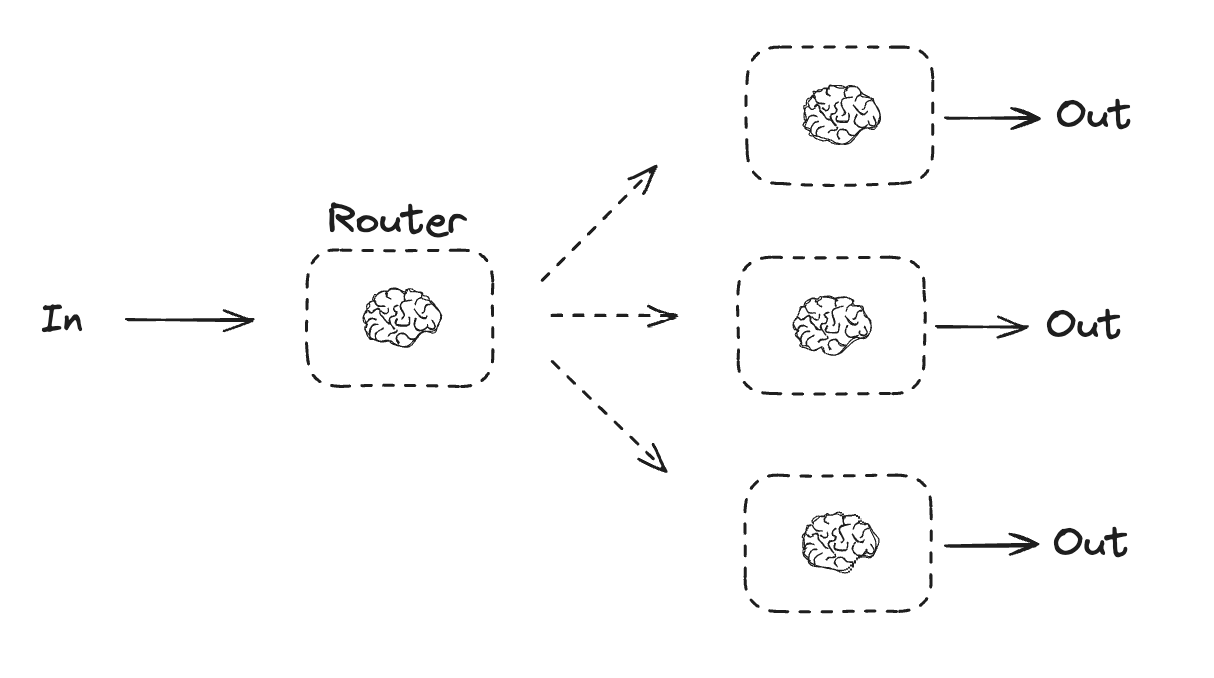
路由工作流会先分析输入,然后将其引导到特定的处理流程中。这使你可以为不同类型的任务定义专门的处理路径。例如,一个产品问答系统可能先判断问题类型,然后分别路由到定价、退款、退货等专门的处理流程。
import { StateGraph, StateSchema, GraphNode, ConditionalEdgeRouter } from "@langchain/langgraph";
import * as z from "zod";

// 用于路由逻辑的结构化输出 Schema
const routeSchema = z.object({
  step: z.enum(["poem", "story", "joke"]).describe(
    "The next step in the routing process"
  ),
});

// 使用结构化输出增强 LLM
const router = llm.withStructuredOutput(routeSchema);

// 图状态定义
const State = new StateSchema({
  input: z.string(),
  decision: z.string(),
  output: z.string(),
});

// 节点定义
// 写故事
const llmCall1: GraphNode<typeof State> = async (state) => {
  const result = await llm.invoke([{
    role: "system",
    content: "You are an expert storyteller.",
  }, {
    role: "user",
    content: state.input
  }]);
  return { output: result.content };
};

// 写笑话
const llmCall2: GraphNode<typeof State> = async (state) => {
  const result = await llm.invoke([{
    role: "system",
    content: "You are an expert comedian.",
  }, {
    role: "user",
    content: state.input
  }]);
  return { output: result.content };
};

// 写诗歌
const llmCall3: GraphNode<typeof State> = async (state) => {
  const result = await llm.invoke([{
    role: "system",
    content: "You are an expert poet.",
  }, {
    role: "user",
    content: state.input
  }]);
  return { output: result.content };
};

const llmCallRouter: GraphNode<typeof State> = async (state) => {
  // 将输入路由到合适的节点
  const decision = await router.invoke([
    {
      role: "system",
      content: "Route the input to story, joke, or poem based on the user's request."
    },
    {
      role: "user",
      content: state.input
    },
  ]);

  return { decision: decision.step };
};

// 条件边函数:路由到合适的节点
const routeDecision: ConditionalEdgeRouter<typeof State, "llmCall1" | "llmCall2" | "llmCall3"> = (state) => {
  // 返回下一个要访问的节点名称
  if (state.decision === "story") {
    return "llmCall1";
  } else if (state.decision === "joke") {
    return "llmCall2";
  } else {
    return "llmCall3";
  }
};

// 构建工作流
const routerWorkflow = new StateGraph(State)
  .addNode("llmCall1", llmCall1)
  .addNode("llmCall2", llmCall2)
  .addNode("llmCall3", llmCall3)
  .addNode("llmCallRouter", llmCallRouter)
  .addEdge("__start__", "llmCallRouter")
  .addConditionalEdges(
    "llmCallRouter",
    routeDecision,
    ["llmCall1", "llmCall2", "llmCall3"],
  )
  .addEdge("llmCall1", "__end__")
  .addEdge("llmCall2", "__end__")
  .addEdge("llmCall3", "__end__")
  .compile();

// 调用
const state = await routerWorkflow.invoke({
  input: "Write me a joke about cats"
});
console.log(state.output);import * as z from "zod";
import { task, entrypoint } from "@langchain/langgraph";
// 用于路由逻辑的结构化输出 Schema
const routeSchema = z.object({
step: z.enum(["poem", "story", "joke"]).describe(
"The next step in the routing process"
),
});
// 使用结构化输出增强 LLM
const router = llm.withStructuredOutput(routeSchema);
// 任务定义
// 写故事
const llmCall1 = task("generateStory", async (input: string) => {
const result = await llm.invoke([{
role: "system",
content: "You are an expert storyteller.",
}, {
role: "user",
content: input
}]);
return result.content;
});
// 写笑话
const llmCall2 = task("generateJoke", async (input: string) => {
const result = await llm.invoke([{
role: "system",
content: "You are an expert comedian.",
}, {
role: "user",
content: input
}]);
return result.content;
});
// 写诗歌
const llmCall3 = task("generatePoem", async (input: string) => {
const result = await llm.invoke([{
role: "system",
content: "You are an expert poet.",
}, {
role: "user",
content: input
}]);
return result.content;
});
// 将输入路由到合适的节点
const llmCallRouter = task("router", async (input: string) => {
const decision = await router.invoke([
{
role: "system",
content: "Route the input to story, joke, or poem based on the user's request."
},
{
role: "user",
content: input
},
]);
return decision.step;
});
// 构建工作流
const workflow = entrypoint(
"routerWorkflow",
async (input: string) => {
const nextStep = await llmCallRouter(input);
let llmCall;
if (nextStep === "story") {
llmCall = llmCall1;
} else if (nextStep === "joke") {
llmCall = llmCall2;
} else if (nextStep === "poem") {
llmCall = llmCall3;
}
const finalResult = await llmCall(input);
return finalResult;
}
);
// 调用
const stream = await workflow.streamEvents("Write me a joke about cats", { version: "v3" });
for await (const snapshot of stream.values) {
console.log(snapshot);
}路由模式的关键在于:先用一次 LLM 调用做"分类"决策(通过结构化输出),再根据决策结果走不同的处理分支。这种模式在实际业务中非常常见,比如客服系统中的意图识别与分流。
编排者-工人(Orchestrator-Worker)
在编排者-工人(Orchestrator-Worker)模式中,编排者负责:
- 将任务拆分为子任务
- 将子任务委派给工人(Worker)执行
- 将工人的输出合成为最终结果
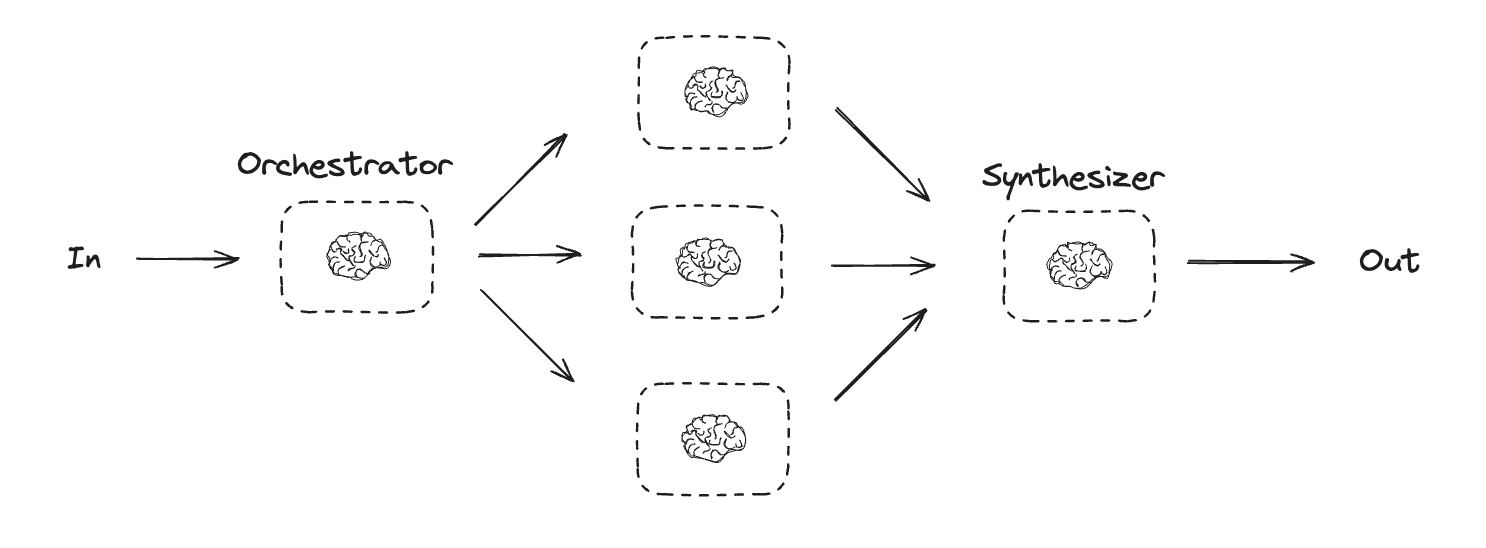
编排者-工人工作流提供了更高的灵活性,通常用于子任务无法像并行化那样预先定义的场景。这在编写代码或需要跨多个文件更新内容的工作流中尤其常见。例如,一个需要为多个 Python 库更新安装说明的工作流,面对未知数量的文档时,就可能采用这种模式。
type SectionSchema = {
    name: string;
    description: string;
}
type SectionsSchema = {
    sections: SectionSchema[];
}

// 使用结构化输出增强 LLM
const planner = llm.withStructuredOutput(sectionsSchema);import * as z from "zod";
import { task, entrypoint } from "@langchain/langgraph";
// 用于规划的结构化输出 Schema
const sectionSchema = z.object({
name: z.string().describe("Name for this section of the report."),
description: z.string().describe(
"Brief overview of the main topics and concepts to be covered in this section."
),
});
const sectionsSchema = z.object({
sections: z.array(sectionSchema).describe("Sections of the report."),
});
// 使用结构化输出增强 LLM
const planner = llm.withStructuredOutput(sectionsSchema);
// 任务定义
const orchestrator = task("orchestrator", async (topic: string) => {
// 生成查询
const reportSections = await planner.invoke([
{ role: "system", content: "Generate a plan for the report." },
{ role: "user", content: `Here is the report topic: ${topic}` },
]);
return reportSections.sections;
});
const llmCall = task("sectionWriter", async (section: z.infer<typeof sectionSchema>) => {
// 生成章节内容
const result = await llm.invoke([
{
role: "system",
content: "Write a report section.",
},
{
role: "user",
content: `Here is the section name: ${section.name} and description: ${section.description}`,
},
]);
return result.content;
});
const synthesizer = task("synthesizer", async (completedSections: string[]) => {
// 从各章节合成完整报告
return completedSections.join("\n\n---\n\n");
});
// 构建工作流
const workflow = entrypoint(
"orchestratorWorker",
async (topic: string) => {
const sections = await orchestrator(topic);
const completedSections = await Promise.all(
sections.map((section) => llmCall(section))
);
return synthesizer(completedSections);
}
);
// 调用
const stream = await workflow.streamEvents("Create a report on LLM scaling laws", { version: "v3" });
for await (const snapshot of stream.values) {
console.log(snapshot);
}在 LangGraph 中创建工人
编排者-工人工作流非常常见,LangGraph 对此提供了内置支持。Send API 允许你动态创建工人节点并向它们发送特定输入。每个工人拥有自己的状态,所有工人的输出都写入一个共享的状态键,编排者图可以访问该键。这样编排者就能获取所有工人的输出并将它们合成为最终结果。下面的示例遍历章节列表,使用 Send API 将每个章节发送给对应的工人。
import { StateGraph, StateSchema, ReducedValue, GraphNode, Send } from "@langchain/langgraph";
import * as z from "zod";

// 图状态定义
const State = new StateSchema({
  topic: z.string(),
  sections: z.array(z.custom<SectionsSchema>()),
  completedSections: new ReducedValue(
    z.array(z.string()).default(() => []),
    { reducer: (a, b) => a.concat(b) }
  ),
  finalReport: z.string(),
});

// 工人状态定义
const WorkerState = new StateSchema({
  section: z.custom<SectionsSchema>(),
  completedSections: new ReducedValue(
    z.array(z.string()).default(() => []),
    { reducer: (a, b) => a.concat(b) }
  ),
});

// 节点定义
const orchestrator: GraphNode<typeof State> = async (state) => {
  // 生成查询
  const reportSections = await planner.invoke([
    { role: "system", content: "Generate a plan for the report." },
    { role: "user", content: `Here is the report topic: ${state.topic}` },
  ]);

  return { sections: reportSections.sections };
};

const llmCall: GraphNode<typeof WorkerState> = async (state) => {
  // 生成章节内容
  const section = await llm.invoke([
    {
      role: "system",
      content: "Write a report section following the provided name and description. Include no preamble for each section. Use markdown formatting.",
    },
    {
      role: "user",
      content: `Here is the section name: ${state.section.name} and description: ${state.section.description}`,
    },
  ]);

  // 将完成的章节写入 completedSections
  return { completedSections: [section.content] };
};

const synthesizer: GraphNode<typeof State> = async (state) => {
  // 已完成的章节列表
  const completedSections = state.completedSections;

  // 将已完成章节格式化为字符串,用作最终章节的上下文
  const completedReportSections = completedSections.join("\n\n---\n\n");

  return { finalReport: completedReportSections };
};

// 条件边函数:创建 llm_call 工人,每个工人负责撰写报告的一个章节
const assignWorkers: ConditionalEdgeRouter<typeof State, "llmCall"> = (state) => {
  // 通过 Send() API 并行启动章节写作
  return state.sections.map((section) =>
    new Send("llmCall", { section })
  );
};

// 构建工作流
const orchestratorWorker = new StateGraph(State)
  .addNode("orchestrator", orchestrator)
  .addNode("llmCall", llmCall)
  .addNode("synthesizer", synthesizer)
  .addEdge("__start__", "orchestrator")
  .addConditionalEdges(
    "orchestrator",
    assignWorkers,
    ["llmCall"]
  )
  .addEdge("llmCall", "synthesizer")
  .addEdge("synthesizer", "__end__")
  .compile();

// 调用
const state = await orchestratorWorker.invoke({
  topic: "Create a report on LLM scaling laws"
});
console.log(state.finalReport);
SendAPI 是 LangGraph 中实现动态 fan-out 的核心机制。与普通的条件边不同,Send允许在运行时根据状态动态决定要创建多少个工人节点以及每个工人接收什么输入,非常适合子任务数量不固定的场景。
评估器-优化器(Evaluator-Optimizer)
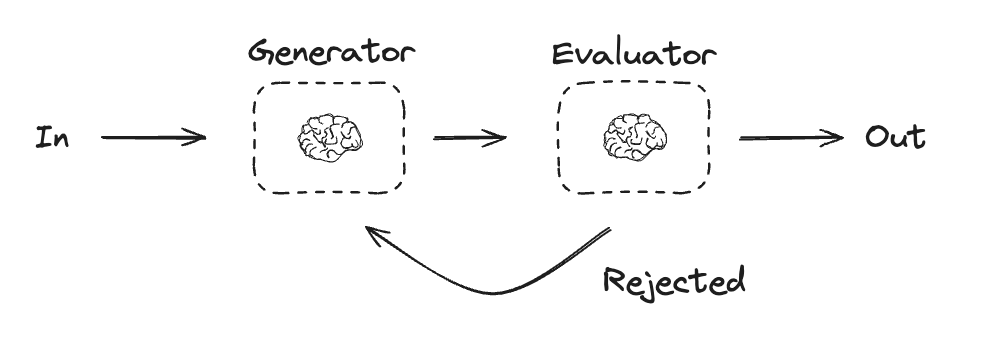
在评估器-优化器工作流中,一个 LLM 调用生成响应,另一个 LLM 调用评估该响应。如果评估器或人机协作判定响应需要改进,则提供反馈并重新生成响应。这个循环会持续进行,直到生成可接受的响应为止。
评估器-优化器工作流通常用于任务有特定成功标准但需要迭代才能达到标准的场景。例如,在两种语言之间翻译文本时并不总是完美匹配,可能需要几次迭代才能生成在两种语言中含义一致的翻译。
import { StateGraph, StateSchema, GraphNode, ConditionalEdgeRouter } from "@langchain/langgraph";
import * as z from "zod";

// 图状态定义
const State = new StateSchema({
  joke: z.string(),
  topic: z.string(),
  feedback: z.string(),
  funnyOrNot: z.string(),
});

// 用于评估的结构化输出 Schema
const feedbackSchema = z.object({
  grade: z.enum(["funny", "not funny"]).describe(
    "Decide if the joke is funny or not."
  ),
  feedback: z.string().describe(
    "If the joke is not funny, provide feedback on how to improve it."
  ),
});

// 使用结构化输出增强 LLM
const evaluator = llm.withStructuredOutput(feedbackSchema);

// 节点定义
const llmCallGenerator: GraphNode<typeof State> = async (state) => {
  // LLM 生成笑话
  let msg;
  if (state.feedback) {
    msg = await llm.invoke(
      `Write a joke about ${state.topic} but take into account the feedback: ${state.feedback}`
    );
  } else {
    msg = await llm.invoke(`Write a joke about ${state.topic}`);
  }
  return { joke: msg.content };
};

const llmCallEvaluator: GraphNode<typeof State> = async (state) => {
  // LLM 评估笑话
  const grade = await evaluator.invoke(`Grade the joke ${state.joke}`);
  return { funnyOrNot: grade.grade, feedback: grade.feedback };
};

// 条件边函数:根据评估器的反馈决定回到生成器还是结束
const routeJoke: ConditionalEdgeRouter<typeof State, "llmCallGenerator"> = (state) => {
  // 根据评估器的反馈决定路由
  if (state.funnyOrNot === "funny") {
    return "Accepted";
  } else {
    return "Rejected + Feedback";
  }
};

// 构建工作流
const optimizerWorkflow = new StateGraph(State)
  .addNode("llmCallGenerator", llmCallGenerator)
  .addNode("llmCallEvaluator", llmCallEvaluator)
  .addEdge("__start__", "llmCallGenerator")
  .addEdge("llmCallGenerator", "llmCallEvaluator")
  .addConditionalEdges(
    "llmCallEvaluator",
    routeJoke,
    {
      // routeJoke 返回的名称 : 下一个要访问的节点名称
      "Accepted": "__end__",
      "Rejected + Feedback": "llmCallGenerator",
    }
  )
  .compile();

// 调用
const state = await optimizerWorkflow.invoke({ topic: "Cats" });
console.log(state.joke);import * as z from "zod";
import { task, entrypoint } from "@langchain/langgraph";
// 用于评估的结构化输出 Schema
const feedbackSchema = z.object({
grade: z.enum(["funny", "not funny"]).describe(
"Decide if the joke is funny or not."
),
feedback: z.string().describe(
"If the joke is not funny, provide feedback on how to improve it."
),
});
// 使用结构化输出增强 LLM
const evaluator = llm.withStructuredOutput(feedbackSchema);
// 任务定义
const llmCallGenerator = task("jokeGenerator", async (params: {
topic: string;
feedback?: z.infer<typeof feedbackSchema>;
}) => {
// LLM 生成笑话
const msg = params.feedback
? await llm.invoke(
`Write a joke about ${params.topic} but take into account the feedback: ${params.feedback.feedback}`
)
: await llm.invoke(`Write a joke about ${params.topic}`);
return msg.content;
});
const llmCallEvaluator = task("jokeEvaluator", async (joke: string) => {
// LLM 评估笑话
return evaluator.invoke(`Grade the joke ${joke}`);
});
// 构建工作流
const workflow = entrypoint(
"optimizerWorkflow",
async (topic: string) => {
let feedback: z.infer<typeof feedbackSchema> | undefined;
let joke: string;
while (true) {
joke = await llmCallGenerator({ topic, feedback });
feedback = await llmCallEvaluator(joke);
if (feedback.grade === "funny") {
break;
}
}
return joke;
}
);
// 调用
const stream = await workflow.streamEvents("Cats", { version: "v3" });
for await (const snapshot of stream.values) {
console.log(snapshot);
console.log("\n");
}评估器-优化器本质上是一个"生成-评估-反馈"的闭环。Graph API 通过条件边实现循环,Functional API 则直接用
while(true)写起来更自然。注意要设置合理的最大迭代次数,避免无限循环。
Agent(代理)
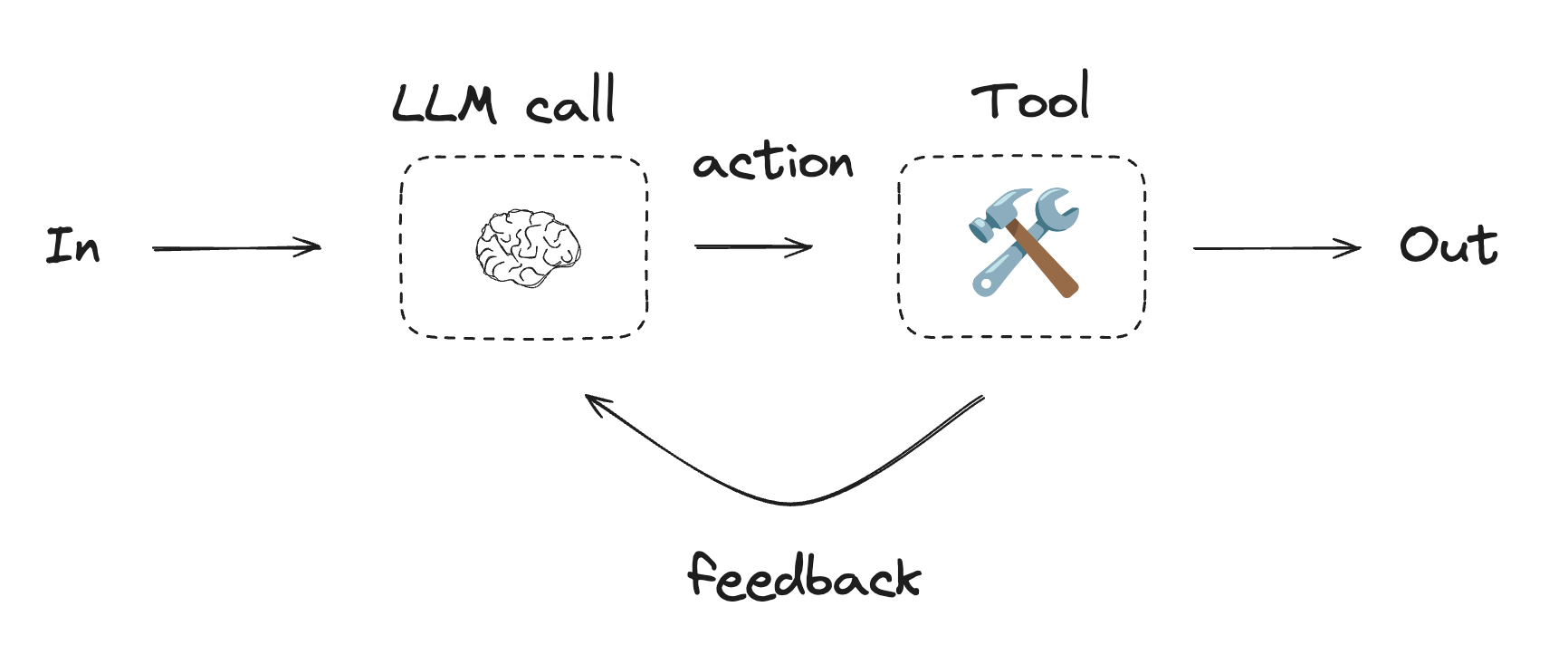
Agent 通常以 LLM 调用工具来执行操作的形式实现。它们在持续的反馈循环中运行,用于问题和解决方案不可预测的场景。Agent 比工作流拥有更高的自主性,能够自行决定使用哪些工具以及如何解决问题。当然,你仍然可以定义可用工具集和行为准则。
INFO
要快速上手 Agent,请参考快速开始,或阅读 LangChain 中关于 Agent 工作原理的详细介绍。
首先定义工具集:
import { tool } from "@langchain/core/tools";
import * as z from "zod";

// 定义工具
const multiply = tool(
  ({ a, b }) => {
    return a * b;
  },
  {
    name: "multiply",
    description: "Multiply two numbers together",
    schema: z.object({
      a: z.number().describe("first number"),
      b: z.number().describe("second number"),
    }),
  }
);

const add = tool(
  ({ a, b }) => {
    return a + b;
  },
  {
    name: "add",
    description: "Add two numbers together",
    schema: z.object({
      a: z.number().describe("first number"),
      b: z.number().describe("second number"),
    }),
  }
);

const divide = tool(
  ({ a, b }) => {
    return a / b;
  },
  {
    name: "divide",
    description: "Divide two numbers",
    schema: z.object({
      a: z.number().describe("first number"),
      b: z.number().describe("second number"),
    }),
  }
);

// 使用工具增强 LLM
const tools = [add, multiply, divide];
const toolsByName = Object.fromEntries(tools.map((tool) => [tool.name, tool]));
const llmWithTools = llm.bindTools(tools);
接下来构建 Agent 循环:
import { StateGraph, StateSchema, MessagesValue, GraphNode, ConditionalEdgeRouter } from "@langchain/langgraph";
import { ToolNode } from "@langchain/langgraph/prebuilt";
import {
  SystemMessage,
  ToolMessage
} from "@langchain/core/messages";

// 图状态定义
const State = new StateSchema({
  messages: MessagesValue,
});

// 节点定义
const llmCall: GraphNode<typeof State> = async (state) => {
  // LLM 决定是否调用工具
  const result = await llmWithTools.invoke([
    {
      role: "system",
      content: "You are a helpful assistant tasked with performing arithmetic on a set of inputs."
    },
    ...state.messages
  ]);

  return {
    messages: [result]
  };
};

const toolNode = new ToolNode(tools);

// 条件边函数:路由到工具节点或结束
const shouldContinue: ConditionalEdgeRouter<typeof State, "toolNode"> = (state) => {
  const messages = state.messages;
  const lastMessage = messages.at(-1);

  // 如果 LLM 发起了工具调用,则执行操作
  if (lastMessage?.tool_calls?.length) {
    return "toolNode";
  }
  // 否则,停止(回复用户)
  return "__end__";
};

// 构建工作流
const agentBuilder = new StateGraph(State)
  .addNode("llmCall", llmCall)
  .addNode("toolNode", toolNode)
  // 添加边来连接节点
  .addEdge("__start__", "llmCall")
  .addConditionalEdges(
    "llmCall",
    shouldContinue,
    ["toolNode", "__end__"]
  )
  .addEdge("toolNode", "llmCall")
  .compile();

// 调用
const messages = [{
  role: "user",
  content: "Add 3 and 4."
}];
const result = await agentBuilder.invoke({ messages });
console.log(result.messages);import { task, entrypoint, addMessages } from "@langchain/langgraph";
import { BaseMessageLike, ToolCall } from "@langchain/core/messages";
const callLlm = task("llmCall", async (messages: BaseMessageLike[]) => {
// LLM 决定是否调用工具
return llmWithTools.invoke([
{
role: "system",
content: "You are a helpful assistant tasked with performing arithmetic on a set of inputs."
},
...messages
]);
});
const callTool = task("toolCall", async (toolCall: ToolCall) => {
// 执行工具调用
const tool = toolsByName[toolCall.name];
return tool.invoke(toolCall.args);
});
const agent = entrypoint(
"agent",
async (messages) => {
let llmResponse = await callLlm(messages);
while (true) {
if (!llmResponse.tool_calls?.length) {
break;
}
// 执行工具
const toolResults = await Promise.all(
llmResponse.tool_calls.map((toolCall) => callTool(toolCall))
);
messages = addMessages(messages, [llmResponse, ...toolResults]);
llmResponse = await callLlm(messages);
}
messages = addMessages(messages, [llmResponse]);
return messages;
}
);
// 调用
const messages = [{
role: "user",
content: "Add 3 and 4."
}];
const stream = await agent.streamEvents([messages], { version: "v3" });
for await (const snapshot of stream.values) {
console.log(snapshot);
}Agent 的核心是一个
while循环:LLM 调用 -> 判断是否有工具调用 -> 执行工具 -> 将结果反馈给 LLM -> 再次调用 LLM。这个循环一直持续到 LLM 不再请求工具调用(即认为已经可以回答用户)为止。
ToolNode
ToolNode 是 LangGraph 中用于执行工具的预构建节点。它会自动处理并行工具执行、错误处理和状态注入。
当你需要对图中工具执行方式进行精细控制时,请使用 ToolNode。它是许多 LangGraph Agent 模式中工具执行的底层构建块。
import { ToolNode } from "@langchain/langgraph/prebuilt";
import { tool } from "@langchain/core/tools";
import * as z from "zod";

const search = tool(
  ({ query }) => `Results for: ${query}`,
  {
    name: "search",
    description: "Search for information.",
    schema: z.object({ query: z.string() }),
  }
);

const calculator = tool(
  ({ expression }) => String(eval(expression)),
  {
    name: "calculator",
    description: "Evaluate a math expression.",
    schema: z.object({ expression: z.string() }),
  }
);

const toolNode = new ToolNode([search, calculator]);
从工具中访问图状态和上下文
由 ToolNode 执行的工具会将模型生成的参数作为第一个参数接收。要读取模型未生成的图侧数据,可以使用以下选项:
- 在 Python 中,通过注入的
ToolRuntime参数读取状态和运行范围上下文。 - 在 JavaScript 中,通过工具的第二个参数读取状态和运行范围上下文,类型为
ToolRuntime。
INFO
工具只能访问传递给 ToolNode 的状态值。当 ToolNode 直接作为 StateGraph 节点添加时,该输入就是当前图状态。如果你从另一个节点手动调用 ToolNode,请在工具需要自定义状态字段时传入完整状态。例如,tool_node.invoke(state) 或 toolNode.invoke(state, config) 会暴露完整状态,而仅传入 {"messages": state["messages"]} 或 { messages: state.messages } 则只会暴露 messages。
import { AIMessage } from "@langchain/core/messages";
import { tool, type ToolRuntime } from "@langchain/core/tools";
import {
  MessagesValue,
  START,
  StateGraph,
  StateSchema,
} from "@langchain/langgraph";
import { ToolNode } from "@langchain/langgraph/prebuilt";
import * as z from "zod";

const State = new StateSchema({
  messages: MessagesValue,
  userId: z.string(),
});

const ContextSchema = z.object({
  organizationId: z.string(),
});

const getUserInfo = tool(
  async (
    _input,
    runtime: ToolRuntime<typeof State.Type, typeof ContextSchema>,
  ) => {
    // 从传递给 ToolNode 的当前图状态中读取
    const userIdFromState = runtime.state?.userId;
    const userIdFromTaskInput = (
      runtime.configurable as {
        __pregel_scratchpad?: { currentTaskInput?: { userId?: string } };
      }
    ).__pregel_scratchpad?.currentTaskInput?.userId;
    const userId = userIdFromState ?? userIdFromTaskInput;
    if (!userId) {
      throw new Error("Missing userId in ToolRuntime state.");
    }

    // 使用 runtime context 获取不在图状态中的显式每次运行值
    const organizationId = runtime.context.organizationId;

    return `User ${userId} in organization ${organizationId}`;
  },
  {
    name: "get_user_info",
    description: "Look up user information.",
    schema: z.object({}),
  },
);

const graph = new StateGraph(State, ContextSchema)
  .addNode("tools", new ToolNode([getUserInfo]))
  .addEdge(START, "tools")
  .compile();

const result = await graph.invoke(
  {
    messages: [
      new AIMessage({
        content: "",
        tool_calls: [{ name: "get_user_info", args: {}, id: "call_user_info" }],
      }),
    ],
    userId: "user_123",
  },
  { context: { organizationId: "org_456" } },
);
小结
本篇我们梳理了 LangGraph 中最常用的工作流和 Agent 模式:
| 模式 | 特点 | 适用场景 |
|---|---|---|
| 提示链 | 线性串联,逐步增强 | 翻译、内容验证等可分解的确定性任务 |
| 并行化 | 多任务同时执行 | 独立子任务、交叉验证 |
| 路由 | 先分类再处理 | 多分支业务逻辑(客服分流等) |
| 编排者-工人 | 动态拆分和委派 | 子任务数量不固定的场景 |
| 评估器-优化器 | 生成-评估-反馈循环 | 翻译、代码生成等需要迭代的任务 |
| Agent | 自主决策工具和流程 | 开放式、不可预测的复杂任务 |
选择哪种模式取决于你的具体场景。实际项目中往往会将多种模式组合使用——比如在一个 Agent 内部嵌入路由或并行化子流程。关键是从简单模式出发,根据需要逐步增加复杂度。
本文基于 LangGraph 官方文档 翻译并二次创作。